


[REAPDOCK-Lua-] -062- [Transcription] Compare transcription results with the script
All postsREAPDOCK👇
[Transcription] Compare the transcript results with the script.
[ LUA ] REAPDOCK/APIDOCK documentation updated
Topic: " Compare the transcript results with the script "
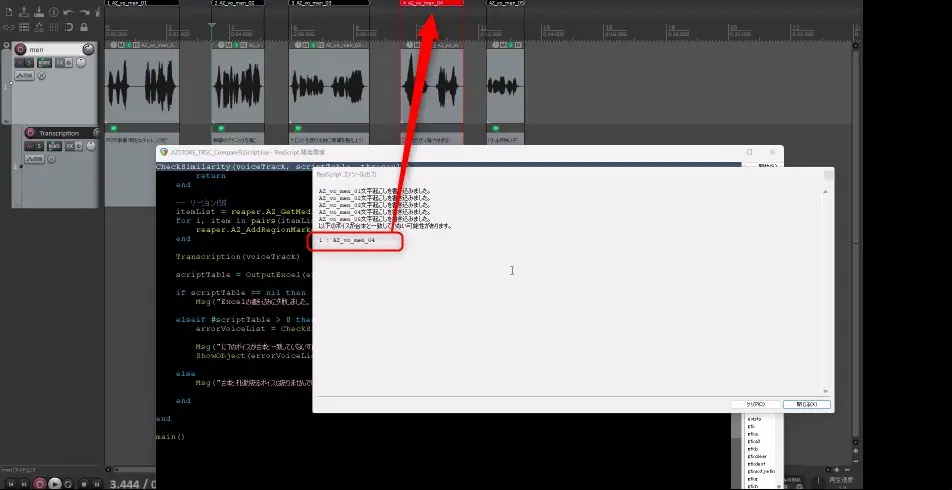
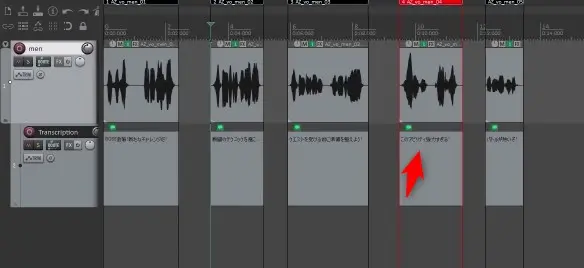
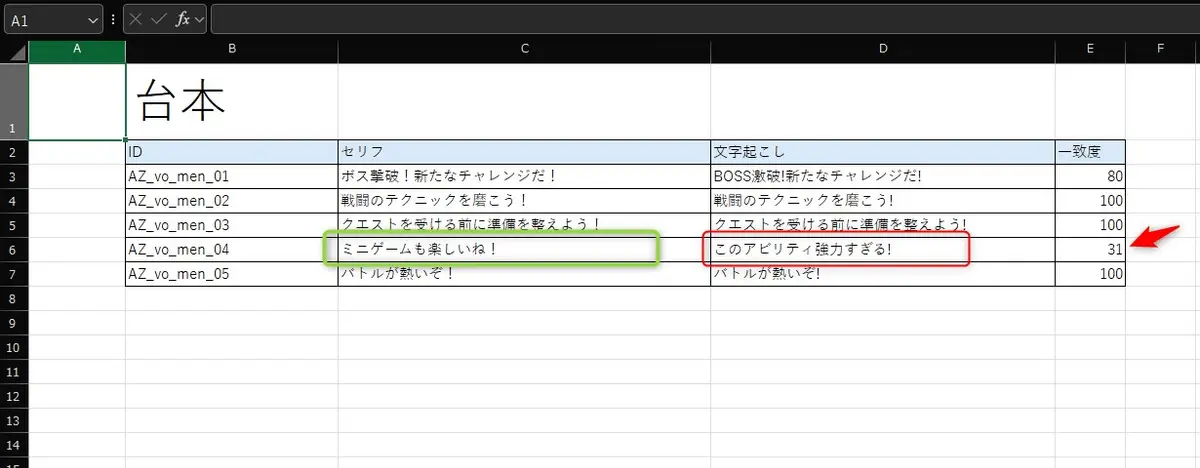
Following on from last time, I will introduce a script that uses the transcription function implemented in SILVER-1.4.0, which was released on March 13th.
This script transcribes audio media, compares the results to an Excel script, and verifies that the content is accurate.
We use an API to calculate the degree of agreement between the transcription results and the script, and if the result falls below a certain level, we highlight the Reaper region with color.
This script can be used to automate the process of verifying the authenticity of large quantities of delivered audio data.
Please give it a try.
For more details about the transcription feature, please see here:
Explanation of the transcription function
◆Required Plan
- RIGDOCKS -BRONZE-
- RIGDOCKS -SILVER-
- RIGDOCKS -GOLD-
□For detailed documentation on how to generate ReaScript, see below 👇
" [Transcription] Comparing the transcript results with the script "
Make your work more efficient with SILVER's API !
Next time, we'll release a Python version of REAPDOCK.
4/30
LINK
For those who are new to Reaper or considering subscribing to a plan.
The Complete Reaper Guide - From Reaper Installation to Reascript Creation -
Reaper Complete Guide Ver.2 - Numerous Useful Settings You Should Know -
See below for the [REAPDOCK]Script documentation.
[ REAPDOCK Table of Contents Page ]
For a list of APIs used in [APIDOCK]Script, please refer to the following table of contents page.
[ APIDOCK-API-Table of Contents Page ]
REAPDOCK List
- [REAPDOCK-Lua-] -061- [Transcription] Transcription results recorded in Excel
- [REAPDOCK-Lua-] -060- [Transcription] Record the transcription results in the memo item
- [REAPDOCK-Lua-] -059- [Excel] A collection of scripts for recording processes - Management- Exporting exported media information to Excel
- [REAPDOCK-Lua-] -058- [Render] A collection of scripts for recording processes - Export- Naming media and outputting to separate folders
- [REAPDOCK-Lua-] -057- [Media] A collection of scripts for recording by process - Organizing - Dividing recorded takes into OK and NG
- [REAPDOCK-Lua-] -056- [Track] A collection of scripts for recording steps - Preparation- Prepare a recording track for each microphone
- [REAPDOCK-Lua-] -055- [Excel] Record audio files managed by Perforce into Excel and check if they are implemented in Wwise ③
- [REAPDOCK-Lua-] -054- [Excel] Recording audio files managed in Perforce into Excel and checking whether they are implemented in Wwise②
- [REAPDOCK-Lua-] -053- [Excel] Recording audio files managed by Perforce into Excel and checking whether they are implemented in Wwise①
- [REAPDOCK-Lua-] -052- [Excel] Setting up audio files managed in Perforce based on an Excel spreadsheet and automatically implementing them in Wwise③
- [REAPDOCK-Lua-] -051- [Excel] Setting up audio files managed in Perforce based on an Excel spreadsheet and automatically implementing them in Wwise②
- [REAPDOCK-Lua-] -050- [Excel] Setting up audio files managed in Perforce based on an Excel spreadsheet and automatically implementing them in Wwise①
Past blog posts can be found here.
- [CEDEC+KYUSHU2024] Successfully automated the process from voice rough editing to Wwise implementation
- [LOUDMATCHFY] Part 2: Running Name Detection Loudness
- [LOUDMATCHIFY] Part 1 : Creating Save Data - Patented Technology 003 -
- [HANDAUTOMER] Part 2 : From importing to loudness adjustment! Volume adjustment without a compressor -
- [HANDAUTOMER] Part 1 : Run HANDAUTOMER on selected media and automatically set to Momentary-21LUFS -
- [TEXT] Save data construction
- [AUTO] Speeding up audio editing - Automatic media insertion -
- [AUTO] Essential for MA production : Session organization automationPart 3
- [AUTO] Essential for MA production : Session organization automation Part 2
- [AUTO] Essential for MA production : Session organization automation Part 1
- [MEDIA] Essential for MA production -Delete all muted media -
- [MEDIA] SE production required! ! -Free Pitch operation -
- [MEIDA] Essential for MA production -Delete all muted media -
- [FOLEY] Foley recording is essential!! -Multiple video copies during recording -
- [MEDIA] "Sound Design" Essential-Fade Automation -
- [MEDIA] Speed up sound designer! ReaScript for freely adjusting playback speed!!
- [MEDIA] Essential for volume adjustment! ReaScript for freely changing the volume!!
- [MEDIA] Essential for MA production : ReaScript to get frame count in 2 seconds!!
- [REC] Essential for recording! : Add “ng” to the selected waveform name
- [MEDIA] Sort all media in ascending OLDER
- [MEDIA] Automatically change all selected media to MONO