


[REAPDOCK-Lua-]-006-Speed up sound designer! ReaScript for freely adjusting playback speed!!
All postsREAPDOCK👇 All media in the specified track is sped up to 0.7x and rearranged every 1 second

[ LUA ]REAPDOCK/APIDOCK document update notification
This is Nakajima from AZSTOKE Co., Ltd.
Today is Weekly Documentation Update Wednesday (LUA).
The topic this time is a script that " speeds up all media on the specified track to 0.7x speed and rearranges them again every second . "
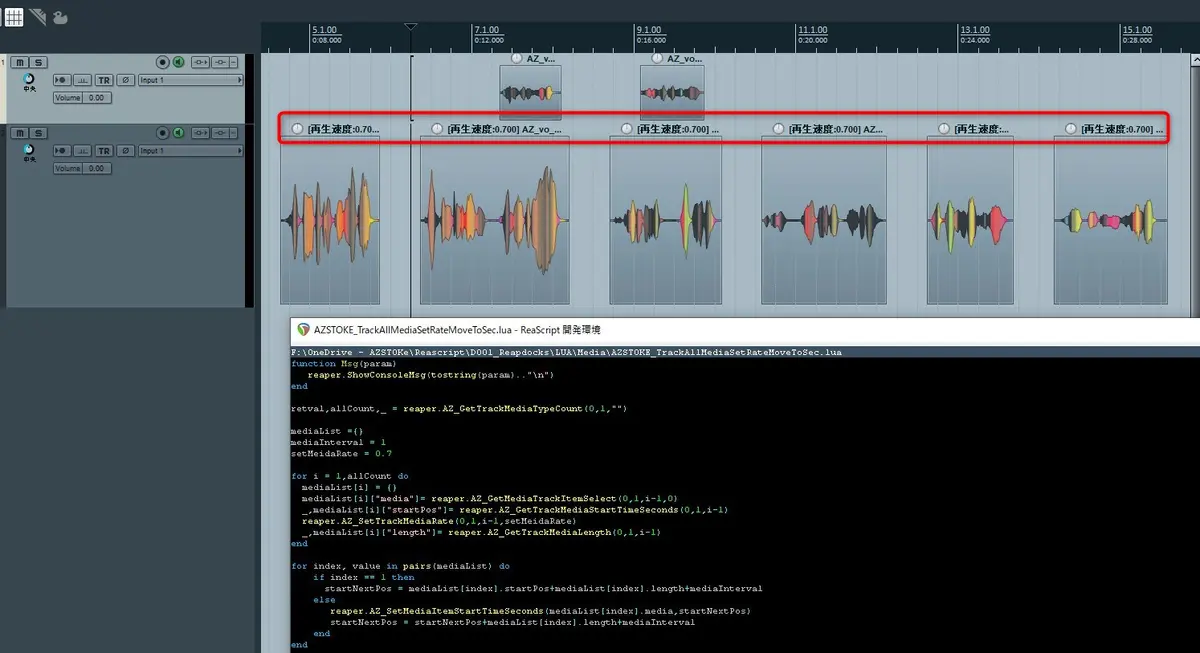
This reference script changes the playback speed to 0.7 and rearranges the images.
Once you understand this technique, you can change the playback speed at will and adjust the position of your media accordingly after the length change.
You will be able to freely adjust it, such as running it on the media of your choice.
□For detailed documentation on how to generate ReaScript, see 👇
All media on the specified track will be re-arranged at 0.7x speed every second
By using BRONZE's API, you can achieve this with just a few lines of code!
Next time: 3/22 Reapdock Python version released
We are currently holding an event to celebrate the announcement of AZSTOKE patent technology.
BRONZE API is currently issuing a 50% OFF code.
Code: "HANDAUTOMER"

LINK
New to Reaper/those considering subscribing to a plan
Complete Guide to Reaper - From Installing Reaper to Creating Reascript -
[REAPDOCK]Script documentation can be found here:
[ REAPDOCK-Lua-Table of Contents Page ]
[ REAPDOCK-Python-Table of Contents Page ]
[APIDOCK] Please refer to the following table of contents for the APIs used in the script.
[ APIDOCK-API-Lua table of contents page ]
[ APIDOCK-API-Python Table of Contents Page ]
REAPDOCK List
- [-Lua-]-001-Automatically change all selected media to mono
- [-Lua-]-002-Sort all media in ascending order
- [-Lua-] -003- Essential for recording! ReaScript that turns a 10 minute task into 2 seconds!!
- [-Lua-] -004- Essential for MA! ReaScript to get frame count in 2 seconds!!
- [-Lua-] -005- Essential for volume adjustment! ReaScript for freely changing the volume!!